Karo.bot vs Tasks.Bot for Multi Step Workflow Automation Software
Your team runs multi step workflows across WhatsApp and three other apps. Every handoff loses a task, and nobody knows who approved what. Choosing the wrong automation tool makes that worse.
This comparison covers what Tasks.Bot does, how it stacks up against Karo.bot, and where each fits multi step workflows. You will see key features, pricing, and trust signals so you can decide which tool suits your team.
What Is Tasks.Bot? WhatsApp-Native Multi Step Workflow Automation
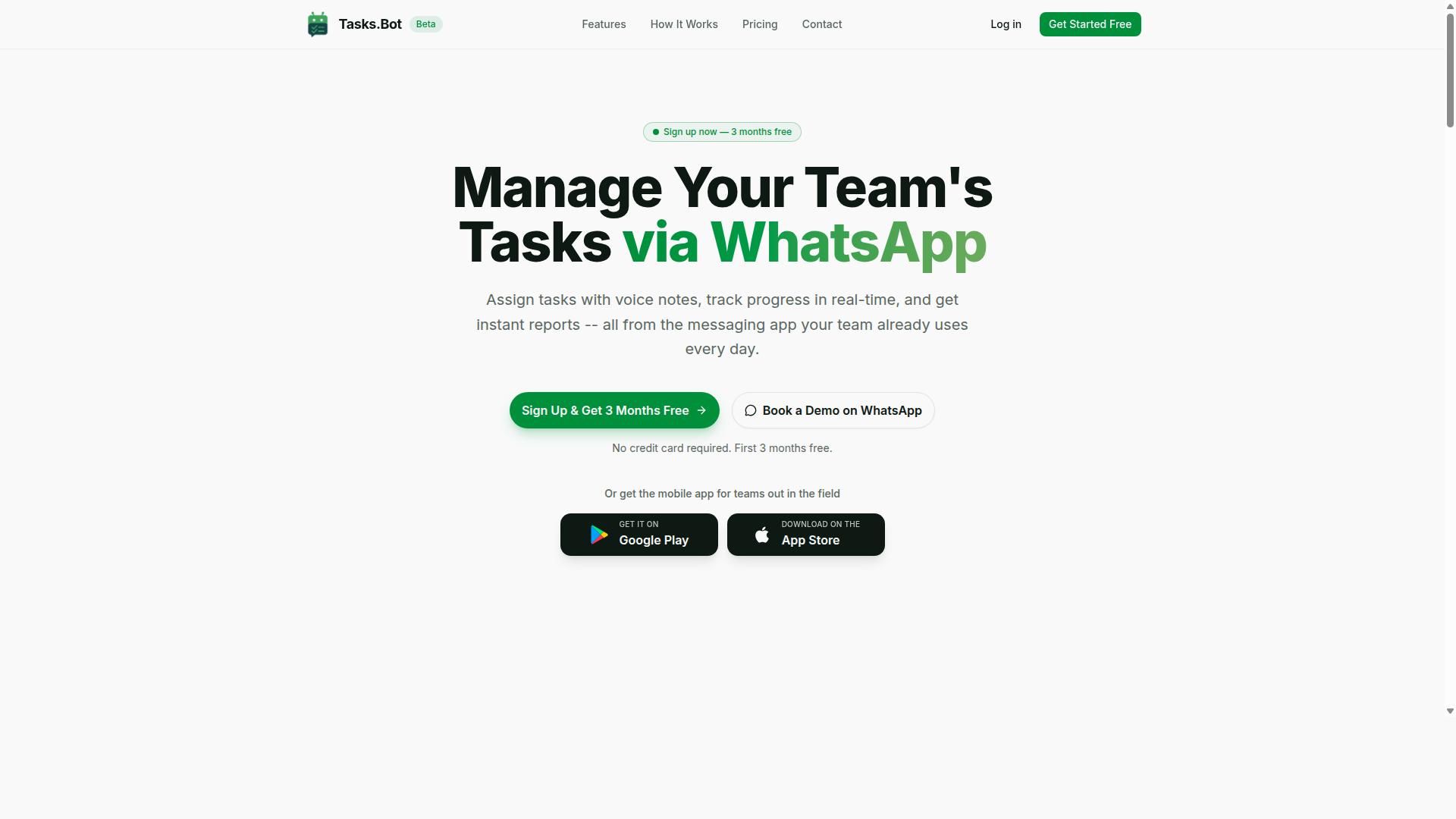
Tasks.Bot is a task management platform that runs entirely inside WhatsApp, letting teams assign tasks, track progress, and receive reports without leaving the messaging app. It functions as a task management bot where work is created through voice notes or text, then handled automatically from there.
AI assigns each task, smart deadline reminders keep work on schedule, and instant reports flow back into the same chat. No new app installations or account creations are needed for team members. A separate mobile app is available for field teams, and the service is currently in beta with a free trial period.
Who Tasks.Bot Serves: Teams With Field Staff Already on WhatsApp
Tasks.Bot is built for teams that already rely on WhatsApp for daily communication, especially those with field staff who need task management, attendance tracking, and payroll-ready hours. For these teams, the messaging app is not a side channel. It is where instructions, updates, and confirmations already happen.
That is exactly where the pain points sit. Task assignments get buried under casual chat, progress is hard to monitor, and reporting means chasing people across calls or spreadsheets. Tasks.Bot closes that gap by placing task assignment, progress tracking, and reporting directly inside WhatsApp, so nothing depends on a tool the field team will not open.
Two capabilities matter most for field operations:
- Attendance tracking tied to the same chat-based workflow
- Payroll-ready hours that support how field staff are paid
The fit is strongest for operations, service, delivery, and inspection teams that work away from a desk. Their communication tool is already chosen. Tasks.Bot simply adds structure to it, with hundreds of teams already using the service during its beta phase.
Tasks.Bot vs Karo.bot: How They Compare for Multi Step Workflow Automation
When evaluating multi-step workflow automation tools, Tasks.Bot and Karo.bot take different approaches to task management and team collaboration. Both qualify as automation platforms, yet they aim at different parts of the workflow problem.
Tasks.Bot specializes in WhatsApp-native task management, handling task assignment, deadline tracking, and progress monitoring inside a messaging app teams already use. Karo.bot, by contrast, may lean toward broader workflow orchestration, with a wider set of tools for building and connecting multi-step processes.
That distinction shapes everything that follows. The sections below break down where Tasks.Bot's design gives it a practical edge, and where the comparison gets closer and calls for your own verification of specific capabilities.
Where Tasks.Bot Wins: No New App, No New Accounts, No Training
Tasks.Bot eliminates the friction of adopting new software by operating entirely within WhatsApp, so team members don't need to install anything or create new accounts. That single design choice removes the three biggest barriers to multi-step workflow automation: downloads, sign-ups, and onboarding sessions.
Rollout is close to instant. A manager can start assigning tasks immediately using natural language or voice notes, and the AI handles assignment and reminders. There is no new interface to learn because the interface is WhatsApp itself, which most teams already open dozens of times a day.
Field work shows the difference clearly. A field worker receives a task via WhatsApp and can update status with a simple reply, no login screen, no dashboard, no app switch. Tasks.Bot also offers face-verified attendance and live GPS tracking for field staff, so location-based work stays accountable without extra tooling.
Compare that with platforms that require an app download, account setup, or training before the first task moves through a sequence. Every extra step slows adoption and invites workarounds. Tasks.Bot's approach also comes with enterprise-grade encryption, and conversations and task data are never shared or used for training. A 3-month free trial with no credit card required lets a team confirm the fit before committing.
Where the Comparison Gets Close - and What to Verify Yourself
While Tasks.Bot excels in WhatsApp-based task management, Karo.bot may offer more advanced workflow orchestration features like conditional branching and API connectivity. If your processes need a visual workflow builder, trigger-action logic, or connections to tools such as Slack or Microsoft Teams, that is the territory to examine closely.
Publicly available information may not answer every question, so treat vendor pages as a starting point rather than proof. Ask each provider directly about the capabilities your process depends on:
- Workflow mechanics: webhook triggers, scheduled workflows, event-driven automation, sequential task execution, and parallel processing
- Control and governance: human-in-the-loop approvals, approval workflows, role-based access control, and audit logs
- Visibility: progress monitoring, deadline tracking, and workflow analytics
- Integration: API connectivity and bot integration with the chat platforms your team uses
For Tasks.Bot specifically, the verified strengths are WhatsApp-native operation, AI-driven task creation from natural language and voice notes, face-verified attendance, live GPS tracking, and enterprise-grade encryption. Confirm how those map to your multi-step sequences.
A demo or trial is the most reliable test. Map one real multi-step workflow end to end in each tool, then judge which one your team would actually keep using. That practical check matters more than any feature checklist.
Key Features for Multi Step Workflows
Tasks.Bot packs a range of features designed to handle complicated processes without leaving WhatsApp, its native integration point. Instead of asking teams to adopt yet another dashboard, it turns the messaging app they already use into a task management bot.
The features that matter most for multi-step workflow automation fall into a few clear groups. Voice note task creation, AI assignment, and smart deadline reminders handle the front end of any process. Approvals, automations, instant reports, and the Live Day Tracker manage the middle. Field team tools like tasks on a map, face-verified attendance, and shift tracking cover the back end.
The sections below break down each group in turn.
Voice Note Task Creation, AI Assignment, and Smart Deadline Reminders
Creating tasks in Tasks.Bot is as simple as sending a voice note or text message, with AI interpreting natural language to assign tasks and set deadlines automatically.
This matters for multi-step workflow automation because the first step in any process is capturing the work. Voice capture removes the friction of typing on a phone, which is often the reason field updates and quick instructions never make it into a formal system. Tasks.Bot also offers voice capture through its Android and iOS apps, so the same natural-language input works outside WhatsApp too.
AI assignment takes the captured task and routes it to the right team member. A manager does not need to manually pick a name for every item. Smart deadline reminders then send automatic nudges before a deadline and escalate when a task is overdue.
Consider a field inspection task. A supervisor sends a voice note describing the inspection. Tasks.Bot creates the task, assigns it, and sets a deadline. If the inspection is not marked complete in time, a reminder escalates to the supervisor. Completing the inspection can trigger a follow-up report task, a simple example of sequential task execution inside a chat thread.
Approvals, Automations, Instant Reports, and the Live Day Tracker
Tasks.Bot supports approval workflows, automations, and instant reporting, giving managers real-time visibility through the Live Day Tracker. These features cover the middle of a multi-step process, where work moves between people and needs a checkpoint before it continues.
An approval workflow lets a task require manager sign-off before it advances to the next step. The request, the review, and the decision all happen within WhatsApp, so nobody has to switch tools to approve a purchase or sign off on a completed job.
Automations let teams set triggers for task creation, assignment, or completion to kick off subsequent actions. This is the trigger-action logic behind workflow orchestration: one event fires, and the next step begins without manual handoff.
Instant reports generate summaries of task status, completion rates, and bottlenecks on demand. The Live Day Tracker is a dashboard showing daily progress across all tasks, useful for spotting where a process has stalled.
A purchase approval workflow shows how these pieces connect. An employee submits a request, the task routes to a manager for approval, and approval triggers the next action automatically. Daily field team check-ins work the same way: each check-in updates the Live Day Tracker, and a missed check-in can raise a flag for the supervisor.
Field Team Tools: Tasks on a Map, Face-Verified Attendance, Shifts and Hours
For field teams, Tasks.Bot offers location-based task views, face-verified attendance, and shift tracking to streamline operations. These tools target the parts of a workflow that happen away from a desk, where visibility is usually weakest.
Tasks on a map let managers visualize assignments geographically, so it is clear which jobs sit near which workers. Face-verified attendance confirms that staff are actually on site when they check in, which supports human-in-the-loop steps that depend on a real person being present. Shift, leave, and hours management ties logged time to payroll and reporting.
The Android and iOS apps support field use with push notifications, voice capture, and a home screen widget, so workers can act without opening a browser or a desktop tool.
Picture a typical field day as a multi-step workflow. A worker checks in with face verification. Tasks on a map then show the day's assignments by location. As each job completes, the worker logs hours, and those hours feed into shift and payroll reports. The whole sequence runs through the same task management bot, with no separate attendance app, map tool, or timesheet to reconcile. That consolidation is what makes these field features part of a workflow rather than isolated utilities.
Pricing and Plans: Full Access With No Feature Tiers
Tasks.Bot offers a single 'Full Access' plan that includes all features, with pricing in Indian Rupees and US Dollars. There is no maze of starter, pro, or enterprise tiers to compare. Every user gets the same complete set of capabilities for multi-step workflow automation.
That simplicity matters when you are evaluating a workflow orchestration tool. Many automation platforms lock trigger-action logic, conditional branching, or workflow analytics behind higher-priced plans. Tasks.Bot takes the opposite approach: one plan, full access.
| Plan | Price | Billing |
|---|---|---|
| Monthly | ₹200 per member per month | Billed monthly |
| Annual | ₹1,200 per year per member | Billed yearly, save 50% |
The annual option saves ₹1,200 per year per member compared to paying monthly. That is a 50% saving for teams that already know they want long-term workflow automation.
New users also get 3 months free, with no credit card required. You can cancel anytime, so there is no long-term lock-in while you evaluate whether the platform fits your task management and approval workflow needs.
Pricing is shown in both Indian Rupees and US Dollars. The site includes a 'Select currency' option for Indian Rupee and US Dollar, so verify the currency before you commit to a plan.
Tasks.Bot is currently in beta. That status may affect pricing or features over time, so the figures above should be treated as current rather than permanent. Always check the website for the latest pricing before making a decision.
For teams comparing automation platform costs, the flat structure removes a common headache. You do not need to estimate how many users will need conditional branching or scheduled workflows later. Everyone on the plan gets the same tools from day one, which makes budgeting for multi-step workflow automation far more predictable.
Trust Signals: Beta Status, Encryption, and Refund Policy
Tasks.Bot is currently in beta, which means features may evolve, but the platform offers encryption and a refund policy to build trust. For anyone weighing a task management bot for multi-step workflow automation, those three signals deserve a closer look before committing.
Beta status cuts both ways. On one hand, it shows a product under active development, so improvements can arrive quickly and early users often shape what gets built next. On the other, beta software can shift under your feet. A visual workflow builder that works one week may behave differently after an update, and edge cases in trigger-action logic or conditional branching may still be getting ironed out.
That trade-off matters most for teams running mission-critical orchestration. If a scheduled workflow or approval workflow feeds into payroll, compliance, or client deliverables, a mid-quarter change to how sequential task execution behaves is a real risk. For internal drafts, experimentation, and low-stakes automation, the same instability is far easier to absorb.
A practical approach is to pilot Tasks.Bot on workflows where a hiccup costs hours, not revenue. Keep a manual fallback for anything tied to deadlines or external commitments. As the platform matures, you can widen the scope.
Encryption is the second trust signal. The verified facts confirm Tasks.Bot offers encryption, which matters because workflow automation platforms touch sensitive material: task assignments, approval chains, progress monitoring data, and audit logs. Encryption protects that data in transit and at rest, reducing exposure if something goes wrong.
It is worth being precise here. Encryption is a baseline expectation, not a differentiator, and the presence of it does not mean every possible security control is in place. Readers should treat it as one positive indicator among several rather than proof that the platform is bulletproof. Avoid assuming certifications, compliance badges, or specific protocols unless the site states them outright.
The third signal is the refund policy mentioned in the footer of the Tasks.Bot website. A published refund policy gives buyers a defined exit if the tool does not fit their needs, which lowers the cost of trying a beta product. The exact terms, such as the window, eligibility, and process, are not spelled out in the available facts, so the only responsible move is to read the footer text yourself before purchasing.
Beyond these three items, Tasks.Bot also lists a Book a Demo on WhatsApp option on its site. For buyers who want to ask pointed questions about stability, data handling, or refund mechanics before committing, that channel offers a direct way to get answers rather than guessing from marketing copy. The site's copyright year is listed as 2026, a small signal that the property is actively maintained.
To evaluate trust signals properly, work through a short checklist:
- Beta status: Confirm which workflows you would run and whether you can tolerate changes mid-project.
- Encryption: Note what the site states, and avoid assuming more than what is written.
- Refund policy: Read the footer terms in full, including any deadlines or conditions.
- Demo channel: Use the Book a Demo on WhatsApp option to ask direct questions.
- Site currency: Check that content and the copyright year look current.
None of this replaces your own review. Trust signals are inputs, not verdicts. The responsible path is to visit the Tasks.Bot website, read the beta notice, the encryption statement, and the refund policy as written, and then decide whether the trade-offs fit your team's tolerance for change.
For a beta-stage automation platform, the combination of active development, encryption, and a published refund policy is a reasonable foundation. It signals a product that is being built in the open and gives buyers a safety net. Treat those signals as a starting point for due diligence, not a substitute for it.
Who Should Choose Tasks.Bot for Multi Step Workflow Automation
Tasks.Bot is ideal for teams that already use WhatsApp and need to manage complicated processes without adopting new software. Instead of asking staff to learn a separate automation platform, it works inside the messaging app they open every day.
That single design decision shapes who gets the most value from it. The verified target audience is clear: teams that use WhatsApp for communication, especially those with field staff who need task management, attendance tracking, and payroll-ready hours.
If your team fits that profile, Tasks.Bot removes the biggest barrier to workflow adoption, which is usually the tool itself. Hundreds of teams already use the service, according to the brand.
Field teams and deskless workers are the strongest fit. People working on site, in transit, or across multiple locations rarely sit at a laptop. A task management bot that lives in WhatsApp meets them where they are.
Consider a field service company. A job is assigned, the technician confirms it, logs attendance, and closes the task, all through chat. The hours captured along the way are payroll-ready, which means less admin cleanup at the end of the week.
Small and medium businesses also benefit because adoption is the hard part. When onboarding means "keep using WhatsApp," resistance drops and training time shrinks.
Remote teams coordinating across time zones fit too. Sequential task execution and deadline tracking keep handoffs visible without a new dashboard to check.
Event planning is another natural use case. Vendors, staff, and organizers can share one channel where assignments, confirmations, and progress updates stay in a single thread.
Organizations that value ease of adoption over deep configuration should lean toward Tasks.Bot. It suits teams that want multi-step workflow automation running this week, not after a lengthy implementation project.
Karo.bot may be the better fit in different scenarios. Teams that need complex integrations with a wide stack of other tools, or heavy conditional branching across many systems, often prioritize a platform built around that kind of connectivity.
If your workflows depend on connecting many external apps and you have the technical resources to manage that setup, a more integration-focused tool can make sense.
The practical recommendation is simple. Choose Tasks.Bot when your team communicates on WhatsApp, includes field or remote staff, and wants task assignment, deadline tracking, and progress monitoring without a steep learning curve.
Choose Karo.bot when deep integration with other tools is the primary requirement and adoption speed matters less. Match the tool to how your team already works, and the workflow follows.
Final Verdict: Is Tasks.Bot the Better Fit Than Karo.bot?
Ultimately, the choice between Tasks.Bot and Karo.bot depends on whether you prioritize WhatsApp-native simplicity or broader workflow orchestration capabilities. Both tools address multi-step workflow automation, but they approach the problem from different directions.
Tasks.Bot is built for teams that already run their daily communication on WhatsApp. Instead of asking people to learn a new dashboard, it brings task management into a channel they already check dozens of times a day. That familiarity lowers adoption friction, which is often the real reason automation projects stall.
Karo.bot, by comparison, tends to appeal to organizations that want deeper workflow orchestration. Teams evaluating visual workflow builders, trigger-action logic, or wide API connectivity may find that style of platform better matched to complex, cross-system processes.
Here is a simple way to decide:
- Choose Tasks.Bot if your team lives on WhatsApp and wants zero-friction task assignment, deadline tracking, and progress monitoring without a steep learning curve.
- Consider Karo.bot if you need advanced conditional branching, parallel processing, or extensive third-party integrations as your primary requirement.
- Weigh your team's habits first. The best automation platform is the one people actually use, not the one with the longest feature list.
For many small and mid-sized teams, the deciding factor is not raw capability but daily usability. A task management bot that fits an existing habit tends to deliver value faster than a more powerful tool that nobody opens.
If you want to see how Tasks.Bot handles multi-step workflow automation firsthand, the practical next step is to book a demo on WhatsApp. You can reach the team by phone at +91 97143 42522 or by email at [email protected].
The verdict is straightforward. If WhatsApp-native simplicity and quick adoption matter most to your team, Tasks.Bot is the better fit. If you need broader workflow orchestration with advanced builders and integrations, Karo.bot may serve you well. Book a demo on WhatsApp today and judge Tasks.Bot against your own workflows.
Frequently Asked Questions
What makes Tasks.Bot different from other multi-step workflow automation tools?
Tasks.Bot runs entirely inside WhatsApp, so your team can assign tasks, get approvals, and receive reports without installing new software or creating new accounts. It uses AI to understand natural language and voice notes for task creation, which makes complicated processes feel like a normal chat rather than a separate tool. It also offers a mobile app for field teams who need tasks on a map, live day tracking, and face-verified attendance.
How much does Tasks.Bot cost compared to Karo.bot?
Tasks.Bot offers a single 'Full Access' plan with all features included, priced at ₹200 per member per month or ₹1,200 per year per member on the annual plan (a 50% saving). Pricing is available in both Indian Rupees and US Dollars. For Karo.bot's current pricing, we recommend checking their website directly, as we can only speak accurately to our own plans.
Can Tasks.Bot handle complicated processes with approvals and deadlines?
Yes. Tasks.Bot supports approvals and automations, automatic task assignment, and smart deadline reminders, so multi-step processes keep moving without manual follow-up. Instant reports give you visibility into progress as each step completes. Everything happens inside WhatsApp, so there's no switching between apps to keep a workflow on track.
Do my team members need to install anything or create new accounts?
No. Tasks.Bot operates entirely within WhatsApp, so team members don't need to install anything or create new accounts to participate in workflows. For field teams, there's also a mobile app that adds capabilities like tasks on a map and live day tracking. This keeps onboarding simple, especially for teams already using WhatsApp for communication.
Which teams get the most value from Tasks.Bot?
Tasks.Bot is built for teams that already use WhatsApp for communication, particularly those with field staff who need task management, attendance tracking, and payroll-ready hours. Hundreds of teams are already using the service, which is currently in beta. If your workflows involve back-and-forth coordination across chat, Tasks.Bot keeps it all in one place.
How can I try Tasks.Bot before committing?
You can book a demo on WhatsApp directly from our website to see how complicated processes run inside the app. Tasks.Bot is available worldwide as a SaaS product with no country restrictions, and a refund policy is listed in our footer. If you have questions before starting, reach us at [email protected] or +91 97143 42522.
Recommended Resources: